

 German (DE)
 French (FR)
Create e-invoices – with review with ZUGFeRD – test first, then request access
📢 Important notice: ZUGFeRD conversion with 7-PDF Attach Extract and Remove + API token only after testing, request and availability check.
PDF-to-ZUGFeRD conversion is a specialized solution for suitable, machine-readable PDF invoices and controlled manual invoice runs. Please test with your own invoices before submitting a request. A license and API token can only be provided after review.
📄 Create an e-invoice – controlled and subject to manual review
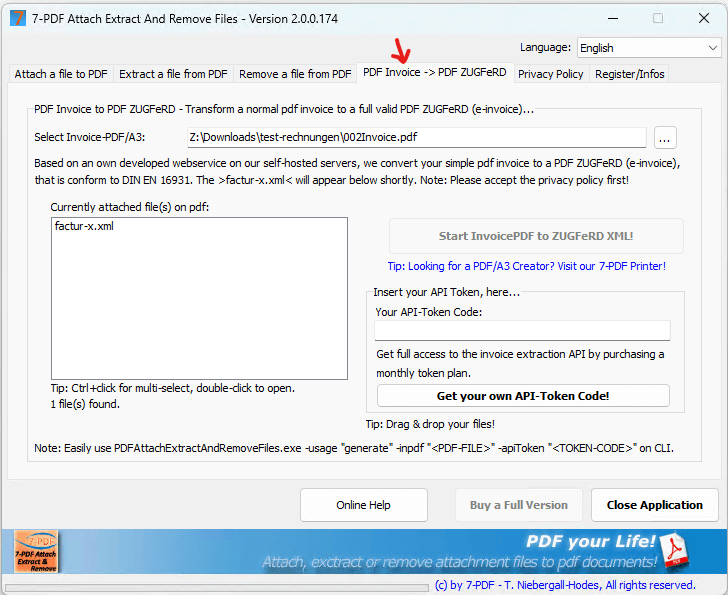
Do you want to convert suitable, machine-readable PDF invoices into a PDF/ZUGFeRD e-invoice according to EN 16931? The 7-PDF Attach Extract and Remove Tool provides a specialized solution for this purpose. It uses AI to analyze existing PDF invoices and embeds structured ZUGFeRD XML into the PDF file.
Important: The conversion requires suitable source documents and must be checked manually before productive use and for every generated e-invoice. The solution is therefore mainly intended for controlled, manual invoice runs and does not replace an invoicing, accounting or ERP solution with native e-invoice generation.
ℹ️ Test first, then request
AI-assisted conversion does not replace an invoicing, accounting or ERP solution and is not intended for unlimited mass conversion, unattended dark processing, SaaS/portal/managed-service use or arbitrary/scanned PDFs.
If parser errors occur during the trial or the generated ZUGFeRD data is not fully correct, you should refrain from purchasing a license or subscription and use a native e-invoicing solution instead.
✅ Controlled workflow for creating e-invoices with 7-PDF
- Prepare the invoice as usual – e.g. in Word, Excel or an existing invoicing system.
- Create a PDF – for example via a print workflow with 7-PDF Printer Professional in PDF/A-3b format.
- Have suitable invoice data detected with AI assistance – using the Invoice Extractor.
- Create a PDF/ZUGFeRD e-invoice with embedded XML – provided that the source invoice is machine-readable and suitable in terms of content.
- Check the result manually – for example additionally with the E-Invoice Validator.
🧠 AI-assisted detection of suitable invoice data
- ✔ Invoice issuer, recipient, IBAN, VAT ID
- ✔ Line items, net/gross totals, VAT
- ✔ AI-assisted generation of a review-required ZUGFeRD XML for suitable invoices
- ✔ Manual review of the generated e-invoice before forwarding is required
👉 Go to the guide: Create an e-invoice step by step in a controlled workflow
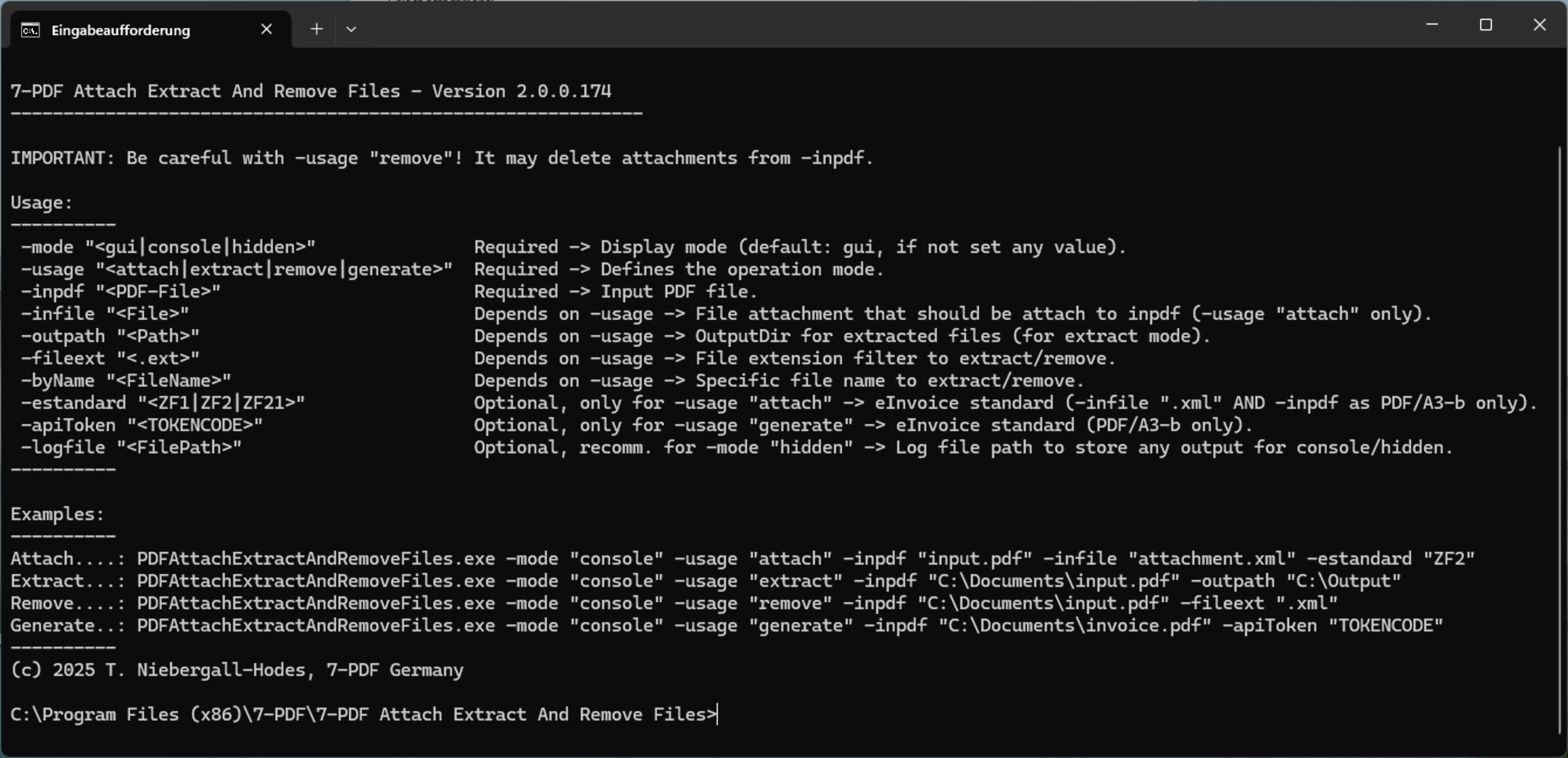
⚙️ Create e-invoices via command line in a controlled workflow
PDFAttachExtractAndRemoveFiles.exe -mode "console" -usage "generate" -inpdf "invoice.pdf" -apiToken "[YOUR_TOKEN]"
💡 The e-invoice is created with AI assistance and linked with XML. The result must then be checked manually. CLI usage is therefore intended only for technically controlled workflows.
📥 Test now – download the tool free of charge
First test with your own PDF invoices whether your documents are suitable for PDF-to-ZUGFeRD conversion. The trial version is intended for this suitability test.
Download 7-PDF Attach Extract and Remove
🎯 Conclusion
With 7-PDF Attach Extract and Remove, suitable, machine-readable PDF invoices can be prepared for a review-required PDF/ZUGFeRD workflow – depending on the use case manually, via a controlled PDF print workflow or AI-assisted with the 7-PDF Invoice Extractor. The solution is mainly intended for small businesses, craft businesses, self-employed professionals and freelancers with controlled manual invoice runs. Every generated e-invoice must be checked visually, professionally, content-wise, formally and technically before being forwarded.
🌐 Alternative: ZUGFeRD Online Portal
Alternative use: Suitable PDF invoices can also be processed in the browser. Use our ZUGFeRD Online Portal at https://konverter.zugferd-rechnungen.de/en/
- 📄 Save your Excel or Word invoice as a PDF
- 🔼 Upload the PDF – convert it with AI assistance into a review-required PDF/ZUGFeRD e-invoice
- 💾 Download the PDF with embedded XML and check it afterwards
To use the service, you need an approved 🔐 API token for our AI-assisted invoice data extractor (7-PDF Invoice Extractor). API token packages are only available after prior testing, request, review and availability check.
✅ GDPR-oriented processing
🌐 Browser-based processing of suitable PDF invoices
📲 Operating-system independent, also usable on tablets, smartphones & more
🇩🇪 German server location
🔐 SSL-encrypted data transfer
👨💻 We do not store invoice data permanently
🎬 Video: ZUGFeRD Online Portal
Downloads
⚠️ Manual review required
AI-assisted ZUGFeRD e-invoices must always be checked visually, technically and content-wise before being forwarded. Responsibility for the invoice remains with the user.