

 German (DE)
 French (FR)
ZUGFeRD Program – Create E-Invoices with review from Standard Invoices – test first, then request access
📢 Important notice: ZUGFeRD conversion with 7-PDF Attach Extract and Remove + API token is available only after testing, request and subject to availability.
PDF-to-ZUGFeRD conversion is a specialized solution for suitable, machine-readable PDF invoices and controlled manual invoice runs. Please test with your own invoices before submitting a request. Licenses and API tokens can only be provided after review.
ℹ️ Test first, then request access
The AI-assisted conversion does not replace invoicing, accounting or ERP software and is not intended for unlimited bulk conversion, unattended dark processing, SaaS/portal/managed-service use or arbitrary/scanned PDFs.
If parser errors occur during the trial, or if the generated ZUGFeRD data is not fully correct, you should not purchase a license or subscription and should use a native e-invoicing solution instead.
📥 Download Now – 7-PDF Attach Extract and Remove Tool
🧰 ZUGFeRD Tool – Prepare, edit & manage e-invoices and attachments
With the 7-PDF Attach Extract and Remove Tool, you get a versatile ZUGFeRD application for preparing, editing, extending or analyzing electronic invoices in the context of ZUGFeRD / DIN EN 16931. Suitable, machine-readable PDF invoices can be converted with AI assistance into review-required PDF/ZUGFeRD e-invoices using the 7-PDF Invoice Extractor. The tool acts as a client application for the 7-PDF Invoice Extractor.
You can add your own structured XML to PDF invoices, extract attachments from ZUGFeRD PDFs or regular PDF files, or attach invoice-related files to existing PDF documents. CLI mode can be used for technically controlled workflows; the generated results remain review-required and should be checked carefully before forwarding.
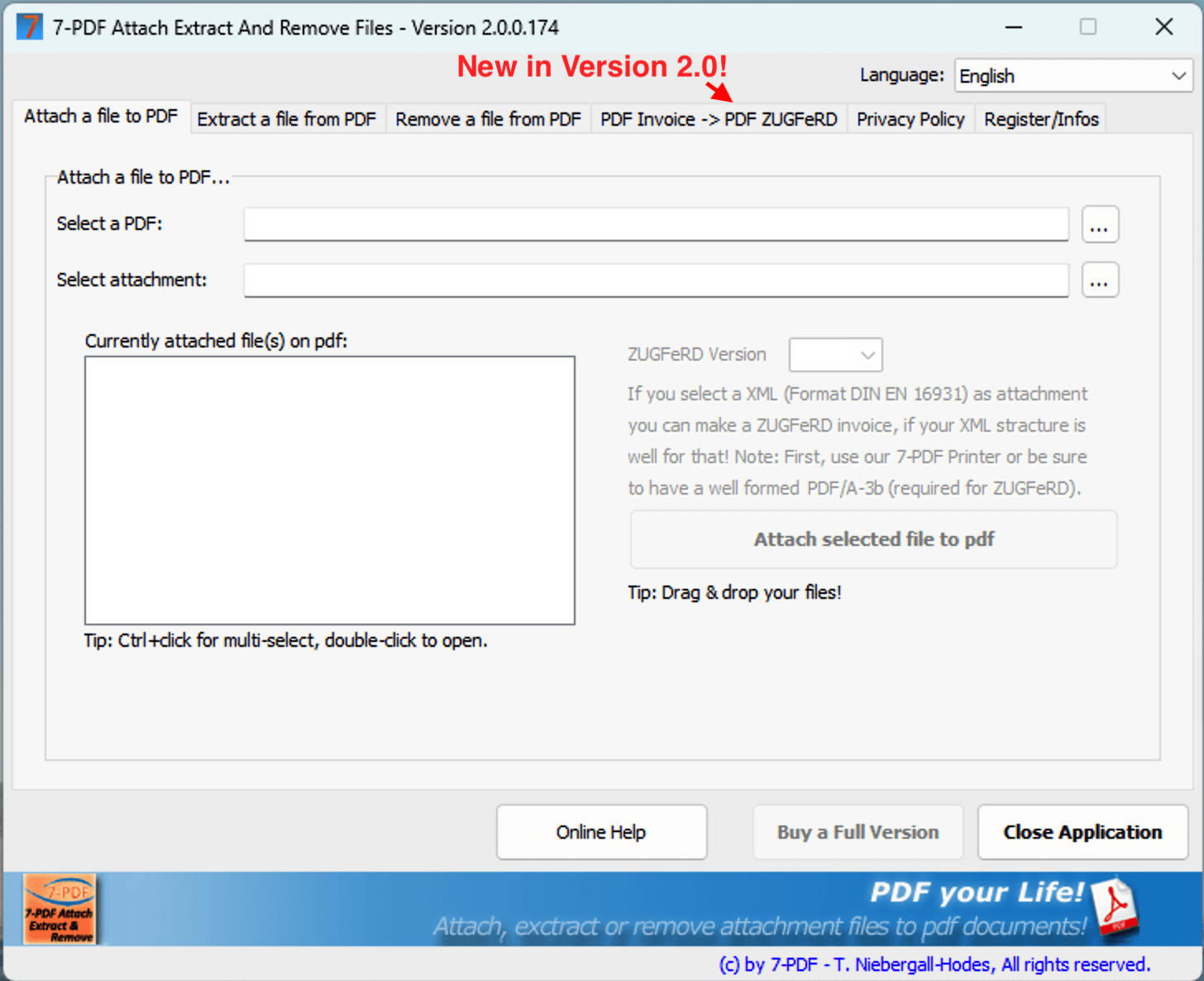
✅ What can this ZUGFeRD tool do for you?
- Convert suitable, machine-readable PDF invoices into review-required PDF/ZUGFeRD e-invoices (via 7-PDF Invoice Extractor).
- Add structured ZUGFeRD or Factur-X XML files if they already exist and correctly match the invoice.
- Attach invoice-related files to existing PDF or PDF/ZUGFeRD documents, such as terms and conditions, order confirmations or correspondence as PDF attachments.
- Remove or extract attachments from PDFs, for example XML files, Office files or other attachments.
- Prepare for technical checking – usable together with the 7-PDF E-Invoice Validator.
- Integration into controlled PDF print workflows with the 7-PDF Printer Professional.
⚙️ 3 options to work with ZUGFeRD invoices
- 1. GUI – for manual, controlled work steps.
- 2. Command Line (CLI) – for technically controlled workflows with manual review.
- 3. Directly via PDF printing with AI-assisted data extraction using the 7-PDF Invoice Extractor.
👉 Setup guide for printing integration:
PDF printing with Invoice Extractor – How it works
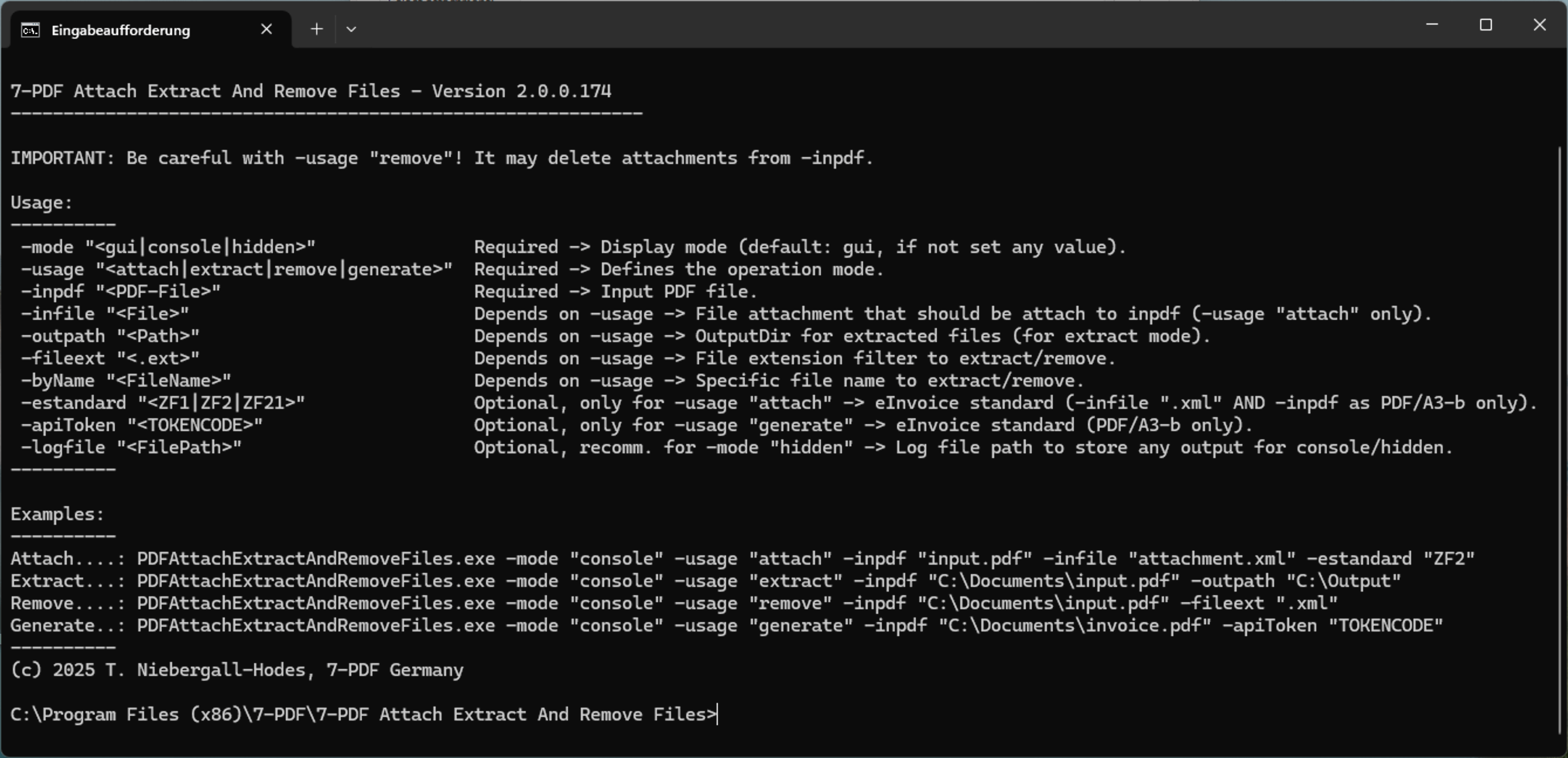
💡 Example CLI usage commands
:: Attach XML file:
PDFAttachExtractAndRemoveFiles.exe -mode "console" -usage "attach" -inpdf "invoice.pdf" -infile "factur-x.xml" -estandard "ZF21"
:: Extract XML file:
PDFAttachExtractAndRemoveFiles.exe -mode "console" -usage "extract" -inpdf "invoice.pdf" -outpath "C:\Output" -fileext ".xml"
:: Remove XML file:
PDFAttachExtractAndRemoveFiles.exe -mode "console" -usage "remove" -inpdf "invoice.pdf" -byName "factur-x.xml"
:: Prepare a suitable PDF invoice with AI assistance as a review-required PDF/ZUGFeRD file:
PDFAttachExtractAndRemoveFiles.exe -mode "console" -usage "generate" -inpdf "invoice.pdf" -apiToken "YOUR_TOKEN"
🤖 From PDF to structured XML using AI
The 7-PDF Invoice Extractor is integrated directly into the tool. Based on AI-assisted analysis, invoice data from suitable, machine-readable PDFs is detected and converted into a review-required XML format in the ZUGFeRD context. The generated data must then be checked visually, professionally, formally and technically.
🎁 Test first
- 🔓 10 free processing runs in trial mode for initial suitability tests with your own representative PDF invoices.
- 🎫 Further use is only possible after testing, request, review and availability of an API token.
- 📅 API tokens or subscriptions are only provided after review; details can be found in the FAQ.
🌐 Alternative: ZUGFeRD Online Portal
Alternative use: Suitable PDF invoices can also be processed in the online portal. Use our ZUGFeRD Online Portal at https://konverter.zugferd-rechnungen.de/en/
- 📄 Save your Excel or Word invoice as PDF
- 🔼 Upload PDF – convert with AI support into a review-required PDF/ZUGFeRD e-invoice
- 💾 Download the PDF with embedded XML and check it afterwards
To use the service, you need an approved 🔐 API token for our AI-assisted invoice data extractor (7-PDF Invoice Extractor). API token packages are only available after prior testing, request, review and availability check.
✅ GDPR-oriented processing
🌐 Browser-based processing of suitable PDF invoices
📲 OS-independent – also usable on tablets, smartphones & more
🇩🇪 German server location
🔐 SSL-encrypted data transfer
👨💻 We do not store invoice data permanently
🎬 Video: ZUGFeRD Online Portal
⚠️ Manual review required
AI-assisted ZUGFeRD e-invoices must always be checked visually, technically and content-wise before being forwarded. Responsibility for the invoice remains with the user.