

 German (DE)
 French (FR)
ZUGFeRD Excel Software – A controlled solution for Electronic Invoices – test first, then request access
📢 Important notice: ZUGFeRD conversion with 7-PDF Attach Extract and Remove + API token is available only after testing, request and subject to availability.
PDF-to-ZUGFeRD conversion is a specialized solution for suitable, machine-readable PDF invoices and controlled manual invoice runs. Please test with your own invoices before submitting a request. Licenses and API tokens can only be provided after review.
ℹ️ Test first, then request access
The AI-assisted conversion does not replace invoicing, accounting or ERP software and is not intended for unlimited bulk conversion, unattended dark processing, SaaS/portal/managed-service use or arbitrary/scanned PDFs.
If parser errors occur during the trial, or if the generated ZUGFeRD data is not fully correct, you should not purchase a license or subscription and should use a native e-invoicing solution instead.
📥 Open guide – ZUGFeRD Excel workflow for electronic invoices
 With ZUGFeRD4Excel, a controlled workflow can be set up for users who want to convert suitable invoices from Excel, Word or other Office applications into a review-required PDF/ZUGFeRD e-invoice.
Instead of macros or complex add-ins, the workflow uses the combination of 7-PDF Printer Professional and the 7-PDF Invoice Extractor. Suitable, machine-readable invoices can be prepared via PDF printing and then converted with AI assistance into a review-required PDF/ZUGFeRD file with embedded XML according to DIN EN 16931.
Important: This solution does not replace invoicing, accounting or ERP software with native e-invoice generation. The generated ZUGFeRD data must always be checked professionally, formally and technically before forwarding.
💡 Controlled workflow step by step
- 📂 Open an Excel template or your own invoice – for example, using our demo invoice.
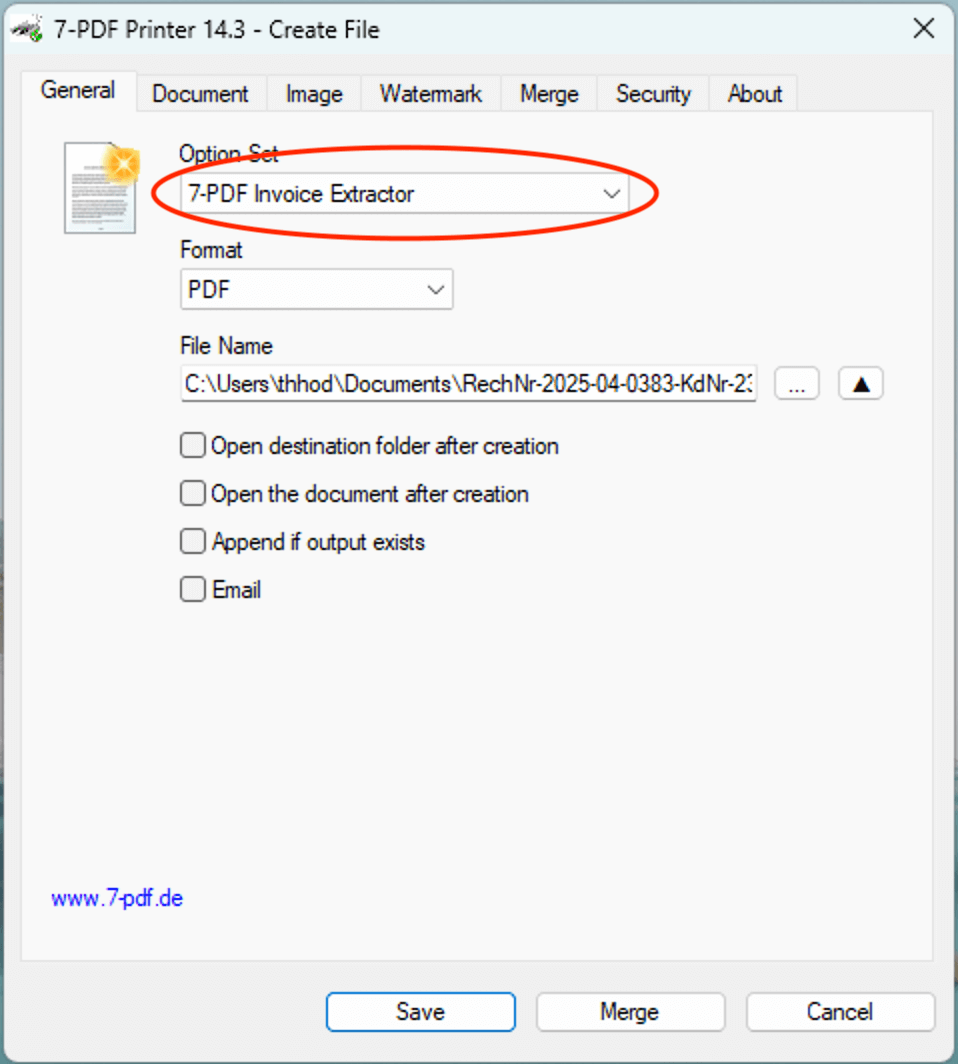
- 🖨 Print to PDF using 7-PDF Printer – select the OptionSet “Invoice Extractor”.
- 🤖 AI supports the detection of suitable invoice data – for example issuer, amounts, taxes and line items.
- 📄 PDF/A-3 with embedded XML can be created, provided that the source data is suitable.
- ✅ Check the generated file afterwards – optionally also with the 7-PDF E-Invoice Validator.
🎁 Test first in trial mode: The test version includes 10 free processing runs for an initial suitability test with your own invoices. An API token/subscription is only available afterwards upon request, review and availability.
Find more details on the required components, licenses, API token and prerequisites in our FAQ here. Please read these notes completely before submitting a request.
You’ll find the guide with setup video, screenshots, setup downloads and demo invoice on the overview page:
👉 ZUGFeRD4Excel – Guide & Getting Started
🌐 Alternative: ZUGFeRD Online Portal
Alternative use: Suitable PDF invoices can also be processed in the online portal. Use our ZUGFeRD Online Portal at https://konverter.zugferd-rechnungen.de/en/
- 📄 Save your Excel or Word invoice as PDF
- 🔼 Upload PDF – convert with AI support into a review-required PDF/ZUGFeRD e-invoice
- 💾 Download your PDF with embedded XML and check it afterwards
To use the service, you need an approved 🔐 API token for our AI-assisted invoice data extractor (7-PDF Invoice Extractor). API token packages are only available after prior testing, request, review and availability check.
✅ GDPR-oriented processing
🌐 Browser-based processing of suitable PDF invoices
📲 OS-independent – also usable on tablets, smartphones & more
🇩🇪 German server location
🔐 SSL-encrypted data transfer
👨💻 We do not store invoice data permanently
🎬 Video: ZUGFeRD Online Portal
🎯 Conclusion
ZUGFeRD4Excel can be a controlled way to create review-required PDF/ZUGFeRD e-invoices from Excel, Word or other Office applications, provided that the invoices are suitable and machine-readable. Before productive use, your own invoices should be tested in trial mode and all generated results should be checked carefully.
⚠️ Manual review required
AI-assisted ZUGFeRD e-invoices must always be checked visually, technically and content-wise before being forwarded. Responsibility for the invoice remains with the user.