

 German (DE)
 French (FR)
ZUGFeRD with legacy ERP (MS-DOS) – Create e-invoices via standard print – test first, then request access
📢 Important notice: ZUGFeRD conversion with 7-PDF Attach Extract and Remove + API token is available only after testing, request and subject to availability.
PDF-to-ZUGFeRD conversion is a specialized solution for suitable, machine-readable PDF invoices and controlled manual invoice runs. Please test with your own invoices before submitting a request. Licenses and API tokens can only be provided after review.
ℹ️ Test first, then request access
The AI-assisted conversion does not replace invoicing, accounting or ERP software and is not intended for unlimited bulk conversion, unattended dark processing, SaaS/portal/managed-service use or arbitrary/scanned PDFs.
If parser errors occur during the trial, or if the generated ZUGFeRD data is not fully correct, you should not purchase a license or subscription and should use a native e-invoicing solution instead.
📥 Open guide – Prepare ZUGFeRD with legacy ERP systems in a controlled workflow
 ZUGFeRD with a legacy ERP system can be relevant for users who want to continue using existing ERP, inventory management or invoicing systems that are no longer actively developed as the starting point for their invoice documents. Print output from older systems, including MS-DOS environments, can generally be tested, provided that suitable, machine-readable PDF invoices can be created from it.
With 7-PDF Printer Professional and the AI-assisted service 7-PDF Invoice Extractor, a controlled PDF/ZUGFeRD workflow can be set up. The normal invoice print from the legacy system is prepared as PDF/A-3b and then analyzed with AI assistance. The generated ZUGFeRD data remains review-required and must be checked professionally, formally and technically before forwarding.
The required PDF/A-3b for this workflow can be created with 7-PDF Printer. After PDF/A creation, the PDF printer can trigger the AI-assisted processing step via 7-PDF Attach Extract and Remove (CLI). The AI function is available in this tool via both GUI and command line.
It is important that the invoice data in the generated PDF is machine-readable – preferably as text/vector data and not only as an image. Important invoice information should be clearly readable and should not exist only in graphics, logos or difficult-to-interpret header areas. This includes, for example, invoice number, date, amounts, tax information, VAT ID and recipient details. Whether a specific print job from a legacy ERP or inventory management system is suitable should always be tested in trial mode with your own documents.
🎁 Test first: The trial version includes 10 free processing runs for initial suitability tests with your own representative PDF invoices from your legacy system. An API token/subscription is only available afterwards upon request, review and availability.
Further details on the required components, licenses, API token and prerequisites can be found in our FAQ. Please read these notes completely before submitting a request.
💡 Step-by-step guide
You’ll find the setup steps and downloads here:
👉 Quick guide – Set up ZUGFeRD via PDF print
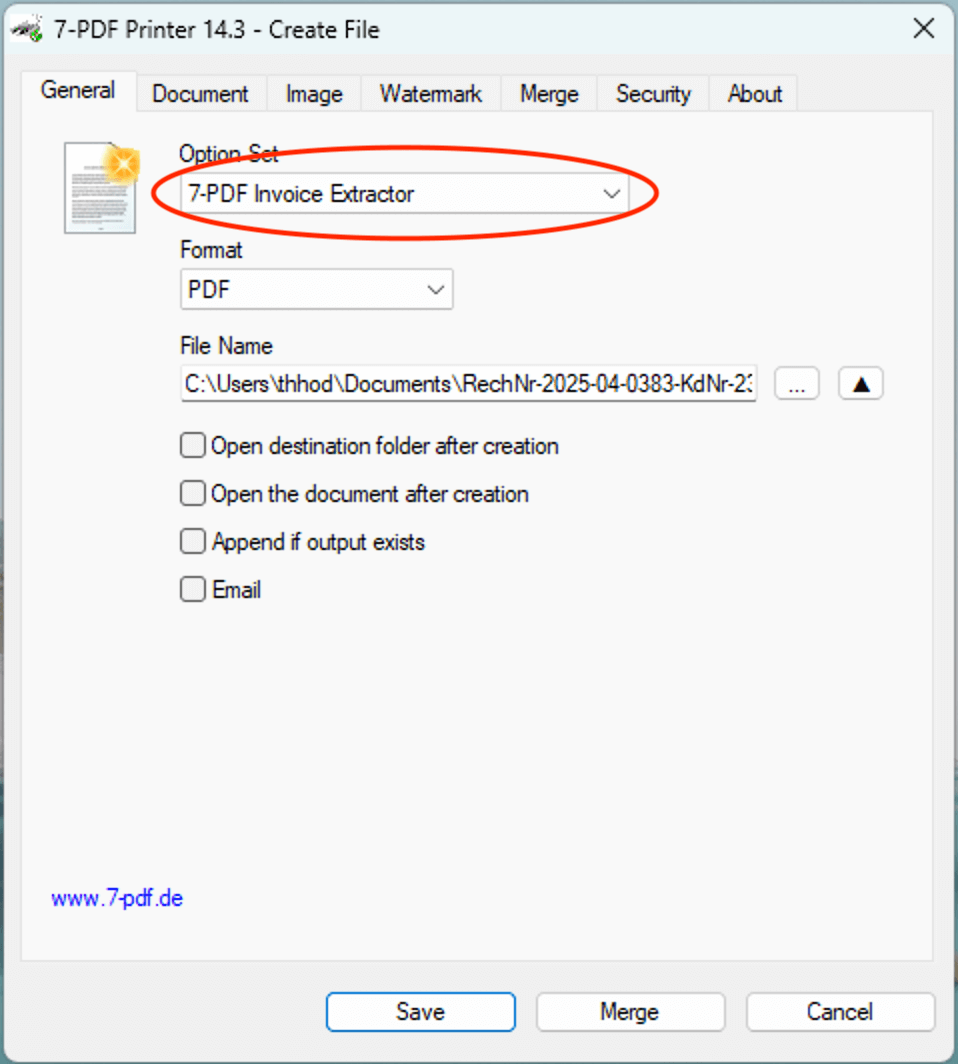
- 🖨 Configure PDF/ZUGFeRD printing with the OptionSet “Invoice Extractor”
👉 via 7-PDF Printer (see quick guide – ZUGFeRD via PDF print)
- 📂 Print the invoice as usual from the legacy ERP/inventory management system – output via 7-PDF Printer
- 🤖 AI-assisted analysis of suitable invoice data – without additional macros or scripting in the legacy system
- 📄 Create a PDF/A-3 with embedded XML based on suitable source data
- ✅ Check the generated file afterwards – optionally also with the 7-PDF E-Invoice Validator
🌐 Alternative: ZUGFeRD Online Portal
Alternative use: Suitable PDF invoices can also be processed in the online portal. Use our ZUGFeRD Online Portal at https://konverter.zugferd-rechnungen.de/en/
- 📄 Output/save the invoice from the legacy ERP system as PDF
- 🔼 Upload PDF – AI-assisted conversion into a review-required PDF/ZUGFeRD e-invoice
- 💾 Download the PDF with embedded XML and check it afterwards
To use the service, you need an approved 🔐 API token for our AI-assisted invoice data extractor (7-PDF Invoice Extractor). API token packages are only available after prior testing, request, review and availability check.
✅ GDPR-oriented processing
🌐 Browser-based processing of suitable PDF invoices
📲 OS-independent – also usable on tablets, smartphones & more
🇩🇪 German server location
🔐 SSL-encrypted data transfer
👨💻 We do not store invoice data permanently
🎬 Video for the ZUGFeRD Online Portal
🎯 Conclusion
ZUGFeRD for legacy ERP systems can be a controlled way to convert suitable, machine-readable invoice print output from existing ERP, inventory management or invoicing systems into review-required PDF/ZUGFeRD e-invoices. Before productive use, your own invoices should be tested in trial mode and all generated results should be checked carefully.
⚠️ Manual review required
AI-assisted ZUGFeRD e-invoices must always be checked visually, technically and content-wise before being forwarded. Responsibility for the invoice remains with the user.